
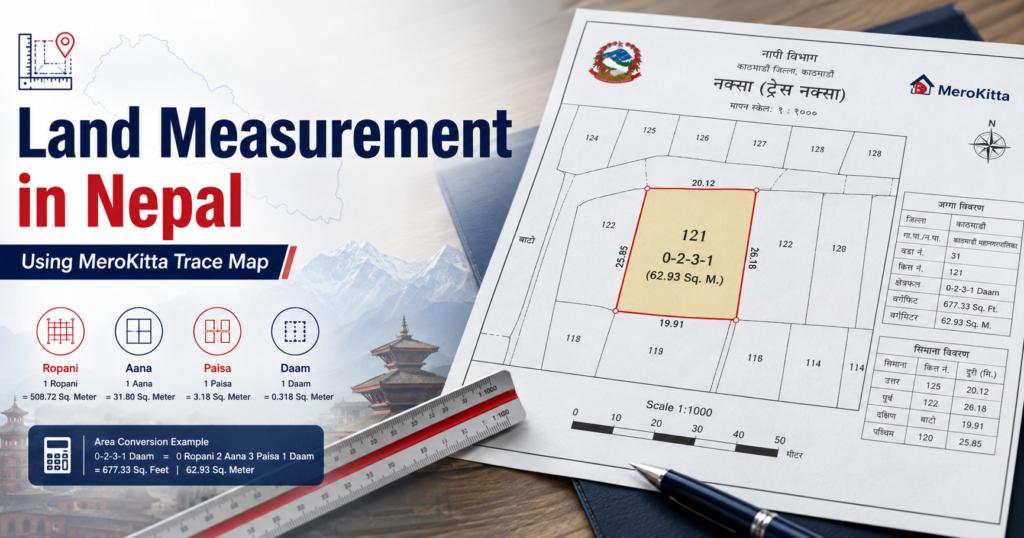
What Is Mero Kitta and Why Homeowners Use It
If you own land in Nepal—or your family does—you have probably heard people say, “Mero Kitta ma hera.” Mero Kitta is the Survey Department’s online land parcel service at merokitta.dos.gov.np. It helps you look up parcel information linked to your kitta (plot) number, view map layers, and understand approximate boundaries before you plan a house, check family property, or talk to a designer.
This guide is written for Nepal homeowners, Kathmandu Valley buyers, and NRNs checking land from abroad. It explains how to use Mero Kitta in plain language, what common errors mean, and—once you know your plot shape—how to calculate usable area in ropani, aana, paisa, daam, and square feet for real construction planning.
Important disclaimer: Official land records, ownership proof, and legal boundaries come only from the Survey Department and related government offices. Mero Kitta is a government portal. Tools on this site, including Area Plotter, are not the official Mero Kitta app and are only for area math and house-planning support. Always verify critical decisions with official documents and local authorities.
Before You Start: What You Should Keep Ready
Mero Kitta is much easier when your paperwork is organized. Keep these nearby:
-
Landowner name as registered
-
District, local level (nagarpalika/gaunpalika), and ward if known
-
Kitta number (plot number) from the lalpurja / land ownership certificate
-
Sheet number / map reference if printed on your documents
-
Old and new address notes if the local body name changed after restructuring
-
A phone number and email you can use for portal access if login/OTP is required
NRNs should ask family in Nepal to photograph both sides of the lalpurja clearly, including kitta number, area mentioned, and any map sketch. Blurry photos are the number-one reason remote checks stall.
How to Use Mero Kitta (merokitta.dos.gov.np)
1) Open the official portal only
Go directly to merokitta.dos.gov.np. Do not trust random APKs, Facebook “Mero Kitta apps,” or paid agents who claim they can “unlock” land records through unofficial software. Bookmark the official site and teach family members the same habit.
2) Create access / log in
The portal flow can change over time, but the usual homeowner path is:
-
Open the official Mero Kitta site.
-
Choose login or registration with the options shown on the page.
-
Complete verification steps (often mobile OTP or the method currently displayed).
-
Sign in and wait for the dashboard or search screen to load fully—slow connections are common, so avoid repeated clicking.
If you are abroad, use a stable connection and a Nepali mobile number already linked to family records when the portal asks for one. If login fails repeatedly, try another browser, disable aggressive VPN routing temporarily, and confirm the number can receive SMS.
3) Find your kitta number the right way
Your kitta number is the plot identifier on the ownership certificate. When searching:
-
Match district and local body carefully—similar place names exist across Nepal.
-
Enter the kitta number exactly as written (including any format shown on your document).
-
If multiple results appear, cross-check owner name, area, and location details before opening a parcel.
-
If nothing appears, verify spelling of names, old VDC/municipality labels, and whether the land was parcelled (kitta katne) into new numbers.
Many families still use memory (“north of the old chowk, second plot”) instead of the certificate. For Mero Kitta, the certificate wins. Get the number from the lalpurja first.
4) View the map and understand trace-map basics
Once the parcel opens, you will typically see a map view and parcel-related details. For house planning, focus on practical reading—not just screenshots:
-
Parcel outline: the shape of your kitta as recorded in the survey layer you are viewing.
-
Adjoining plots / context: neighbouring parcels help you understand which side faces the road or access strip.
-
Orientation: note approximate north so designers can plan light, setbacks, and entry.
-
Trace / print habits: if you trace or export a view for discussion, label it with kitta number, date accessed, and “for reference only.”
A portal map is a planning aid. It may not show every on-ground fence offset, recent subdivision, illegal encroachment, or under-construction road widening. Before final design or purchase, compare portal view + lalpurja + physical site measurement.
5) Save a clean reference pack
For yourself, your designer, or relatives abroad, save:
-
Screenshot of parcel details (kitta, location labels, area if shown)
-
Map view with boundaries visible
-
Photo of lalpurja
-
Short note: access road side, slope, existing temporary structures, high-tension line, drain, or neighbour wall disputes
This pack is especially useful for NRN families deciding whether a plot can take a 2–2.5 storey home, parking, or rental floor later.
Common Mero Kitta Errors and What to Do
Login or OTP not arriving
Check mobile network, spelling of the number, and SMS blocking. Try again after a few minutes. Abroad, SMS delays are normal—do not create multiple half-finished accounts in panic.
“No record” or wrong parcel
Usually caused by incorrect kitta entry, wrong local body, outdated place name, or land that was split/merged. Re-read the lalpurja and ask the family member who last paid taxes which office and kitta they used.
Map loads blank, slow, or incomplete
Often a connectivity or browser issue. Refresh once, switch browser, or try off-peak hours. If details load but imagery is weak, still record the parcel geometry and verify on site.
Area on portal and lalpurja feel different
Do not assume a website figure alone is enough for construction budgeting. Use official documents as the legal reference, then measure buildable shape on the ground. Encroachments, setback rules, right-of-way, and irregular edges change what you can actually build.
Family dispute or multiple heirs
Mero Kitta can support understanding of parcel identity, but it does not replace legal partition, succession paperwork, or in-person office processes. For construction, unresolved ownership is a stop sign—not a design problem.
NRN Guide: Checking Family Land From Abroad
If you live outside Nepal, Mero Kitta is one of the best first filters before you book flights or send design money. A practical remote workflow:
-
Collect clear lalpurja photos and tax receipts from family.
-
Log in to the official portal and locate the kitta.
-
Screenshot parcel/map views and store them in a shared folder.
-
Ask someone trusted on the ground to walk the boundaries with a simple sketch: road side, neighbour walls, electric pole, drain, and level difference.
-
Convert the likely buildable outline into ropani–aana and square feet before discussing floors, parking, or rental units.
-
Only then move to concept design and a realistic construction budget.
NRN projects fail less from “bad architecture” and more from unclear land geometry, access width, and total budget blind spots. Clear the land picture first.
After Mero Kitta: Calculate Real Land Area in Ropani, Aana, Paisa, Daam & Sq Ft
Finding the kitta is step one. Step two is knowing how much area you can actually plan on. Nepal land discussion still runs on traditional units:
-
1 ropani = 16 aana
-
1 aana = 4 paisa
-
1 paisa = 4 daam
-
In common conversion used for planning discussions, 1 ropani ≈ 5476 sq ft (so 1 aana ≈ 342.25 sq ft)
Your lalpurja may state area in ropani–aana–paisa–daam. Construction drawings, material estimates, and per sq ft talks usually need square feet or square metres as well. Irregular plots make mental math risky: a long narrow kitta and a near-rectangular kitta with the “same aana” do not give the same comfortable house footprint after setbacks.
What to measure for buildable area
For house planning, separate three ideas:
-
Documented area: what the ownership record states
-
Boundary geometry: actual side lengths and angles on site
-
Buildable / usable area: what remains after access realities, setbacks, and practical constraints
Designers and owners get into trouble when they budget a full house on documented aana without checking whether the plot is pointed, steep, or eaten by a narrow road face.
Use a free area plotter for the math (planning only)
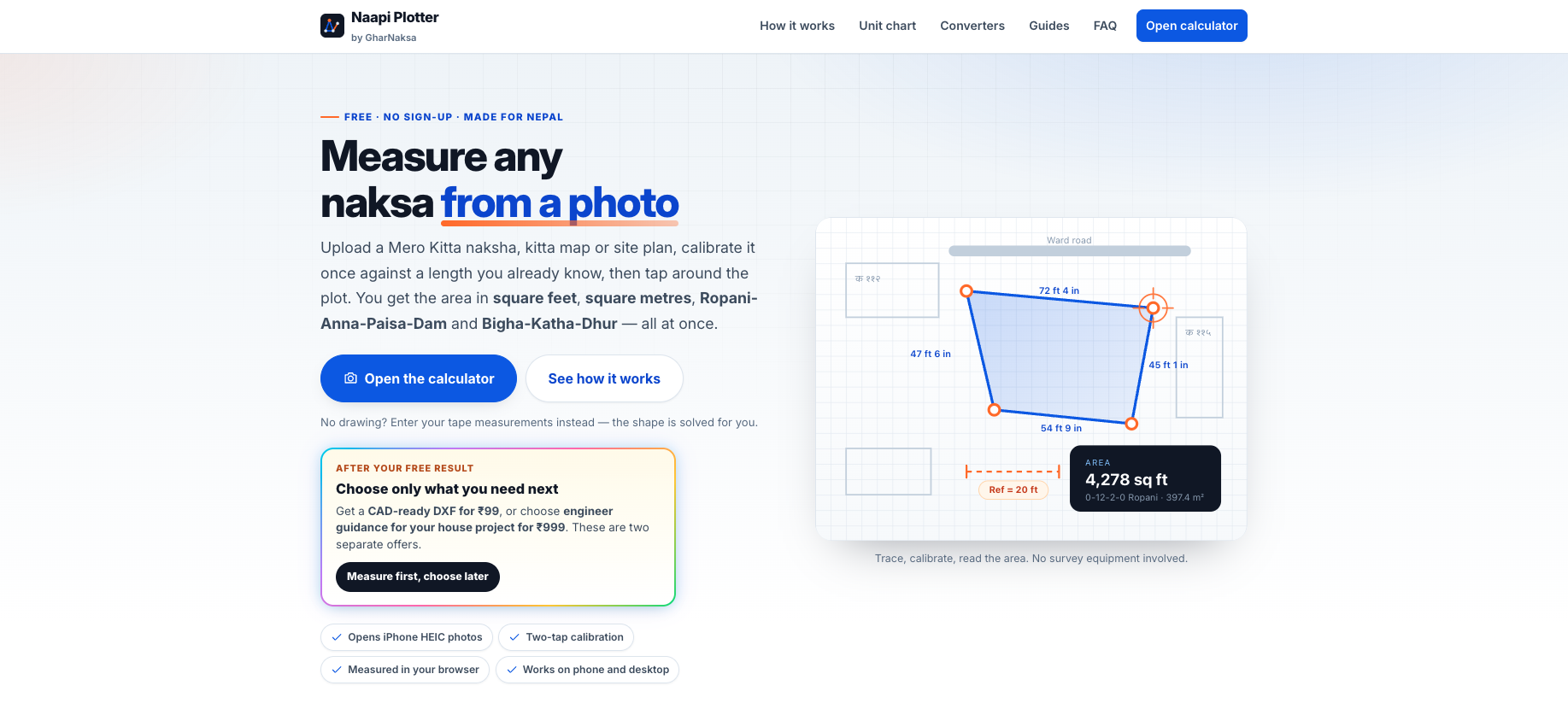
Once you have approximate side lengths from site measurement or a clear boundary sketch, calculate the polygon area instead of guessing from one frontage length. You can do that free with Area Plotter by House Design in Nepal—built for ropani, aana, paisa, daam, and sq ft style planning conversations.
Use it to:
-
Plot irregular boundaries with side dimensions
-
Convert results into units Nepali families actually discuss
-
Share a clearer area picture with parents, siblings, or your designer before naksa work
-
Cross-check whether a desired footprint is realistic on that kitta
Again: Area Plotter is not an official land-record system and is not Mero Kitta. It does not prove ownership. It helps with area math and construction planning only. Legal authenticity remains with the Survey Department and official documents.
Calculate your plot area free on Area Plotter →
From Land Area to House Plan and Construction Cost
When plot area is clear, the next homeowner questions are predictable: What size house fits? How many floors make sense? What will RCC work cost?
For Nepal house budgeting, do not multiply “floor count × a round sq ft number” and stop there. A serious estimate should respect foundation/plinth coverage logic, circulation, balcony/projection choices, and whether a floor is for self-use or rent. If you are comparing construction budgets, start with a Nepal-focused RCC house cost calculator and keep total project costs in view—boundary wall, gate, septic, water tank, electrical, tiling, railing, and interiors—not only the structural shell.
Practical sequence we recommend to homeowners and NRNs:
-
Verify kitta identity on official Mero Kitta / documents
-
Measure and calculate real geometry with an area tool
-
Decide self-use vs rental floors early
-
Freeze a design direction that matches plot and budget
-
Run RCC and overall construction cost ranges before demolishing or casting footing
Quick Checklist: Mero Kitta to Build Decision
-
Official portal only: merokitta.dos.gov.np
-
Kitta number copied from lalpurja, not from memory
-
Map/parcel screenshot saved with date
-
On-ground boundary sketch with road face marked
-
Area converted to ropani–aana and sq ft
-
Buildable area discussed before final floor count
-
Budget planned beyond per sq ft slogans
-
Legal doubts cleared before design payment milestones
Final Takeaway
Learning how to use Mero Kitta gives you parcel clarity. Learning how to calculate your land area gives you design clarity. You need both. Use the Survey Department portal for official land identity, measure the plot like a builder, then run the numbers before you commit to floors, façade style, or contractor advances.
When you are ready to turn boundaries into numbers you can discuss with family and your designer, open the free Area Plotter and calculate your land in ropani, aana, paisa, daam, and square feet. For structural budget ranges on a Nepal RCC house, continue with the RCC House Cost Calculator.
Disclaimer: This article is general homeowner guidance. It is not a government notice, not a title search report, and not legal advice. Official land records remain with the Survey Department and authorised offices. Area Plotter and related calculators are planning tools only.